How to Join and Post on the Purse Forum: A Step-by-Step Guide for Luxury Handbag Lovers
New to the Purse Forum? Learn how to register, create threads, reply, and join the conversation with this easy guide for luxury handbag enthusiasts.
Welcome to the Purse Forum Community
Since its launch just two weeks ago, the Purse Forum has grown into a vibrant space where handbag lovers connect, share knowledge, and discuss everything from authentication to style. With hundreds of active threads and thousands of daily readers, the forum is quickly becoming a go-to resource for luxury accessory enthusiasts.
If you love luxury handbags, the Purse Forum is a welcoming place to learn, share, and connect with other enthusiasts. It is especially useful for anyone who wants practical advice on authentication, styling, care, buying, and everyday use. Whether you are a longtime reader or just getting ready to participate, the steps below will help you move from browsing to posting with confidence.
Step 1: Register Your Account
To post questions or share your own insights, you first need a registered account. The process is simple:
- Visit the Purse Forum registration page.
- Provide a working email address and choose a nickname.
- Submit the registration form.
- Check your email inbox for a confirmation link and click it to activate your account.
This verification step ensures that only real people join the community, keeping the forum free from spam bots.
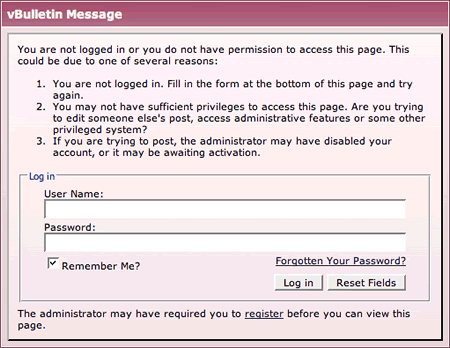
Once your account is active, you can usually post new threads, reply to existing discussions, and save your preferences. If you run into an access message while trying to respond, it typically means you still need to complete registration or sign in.
Step 2: Explore the Forum Structure
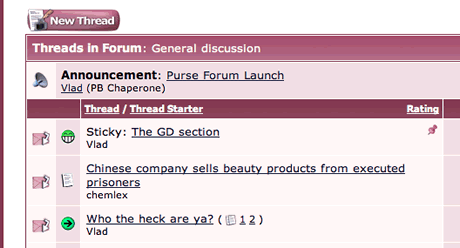
Once your account is active, head to the main forum index. You will find five sub-forums where you can post, plus a read-only section containing community rules and guidelines. These rules are straightforward, but it is worth reviewing them before you start.
Each sub-forum is dedicated to a specific topic. When you open one, you will see a list of threads. A thread is a conversation started by a member. The listing shows how many views and replies each thread has, helping you spot the most popular discussions.
Step 3: Start a New Thread
A thread is a single discussion started by a member, and replies appear underneath it. Looking through thread titles and recent replies can help you learn the tone of the community and find the best place for your own question.
- Enter a clear, descriptive title for your thread.
- Write the body of your message.
Do not worry about advanced formatting options yet. Once you are satisfied, click Submit New Thread. Your post will appear at the top of the thread list.
Step 4: Reply to Existing Threads
If you want to ask a question or begin a new discussion, look for the option to create a new thread. A strong thread title is specific and informative, since it helps other members understand your topic at a glance.
To add your own reply:
- Click the Post Reply button to open the full editor.
- Alternatively, use the Quick Reply box at the bottom of the thread. Just type your message and click Post Quick Reply.
If you want to respond directly to a specific comment, click the Quote button on that post. A quoted version will be included in your reply automatically.
Step 5: Follow Community Guidelines
Replying is often the easiest way to begin participating. You can add your thoughts to an active discussion, answer a question, or share your experience with a bag you own or have handled.
Need More Help?
If you have additional questions, feel free to reach out via email or leave a comment below. Tomorrow’s guide will cover advanced forum features like private messaging, signatures, and profile customization.
When responding, stay focused on the original topic and be respectful of different opinions. If you are referencing another member’s comment, quote only the part that is relevant so your reply remains easy to follow.
The Best Bags Guests Carried to Dior’s Fall 2026 Couture Show
Are Handbags the Gateway to Luxury Ready-to-Wear?
In general, the best posts are clear, courteous, and relevant. If you are asking for authentication help, for example, place the request in the appropriate section rather than a general chat area. That makes it easier for experienced members to find and answer your post.
World Cup Players’ Best Bags: The Follow-Up Edit
Hohom — Summer Travel Mesh Tote Bag
LANEIGE — Lip Glowy Balm
The more familiar you become with the forum, the easier it will be to join in naturally. Start small, be specific, and keep your tone friendly. That approach works well whether you are asking for advice, sharing a purchase, or joining a conversation about a favorite handbag.
Project Cloud — Flip Flops
Related Long-Tail Keywords
- replica how to join and post on the purse forum: a step-by-step for luxury lovers quality guide
- how to style a replica how to join and post on the purse forum: a step-by-step for luxury lovers bag
- replica how to join and post on the purse forum: a step-by-step for luxury lovers material and hardware details
- replica how to join and post on the purse forum: a step-by-step for luxury lovers size and fit guide
- replica how to join and post on the purse forum: a step-by-step for luxury lovers buyer checklist

Interested in replica luxury bags? Contact us.
WhatsApp: +852 46220086 Telegram: @samchen99 Instagram: @repbags7Scan the QR code or contact us directly